

In today's blog, I am going to tell you how to get something that resembles EXPLAIN ANALYSE out of Databricks. In a programmatic, machine-readable form – so you or your LLM don't need to click around the UX manually.
I needed this for SQL Arena. It turned out to be harder than I thought. Let me share my pain with you and give you the tools you need to do this yourself.
Sitting down with a drink? You will need it...
What did I want?
I wanted something from Databricks that I thought would be easy:
- A simple
EXPLAINoutput in machine-readable form - Containing row estimates and actual values (from executing the query)
- And a machine readable query tree of the steps Databricks actually executed
This type of information is commonly provided by any databases made the last 50 years, by issuing a single command. It is table stakes (pun intended).
You use the EXPLAIN output to discover if the database you are running against knows how to do query planning – and to quickly find any mistakes you made while writing the query.
What's the problem with Databricks EXPLAIN?
We start our journey by reading the docs of Databricks EXPLAIN.
To my horror, I discover that there is no EXPLAIN ANALYSE. Let me say that again: EXPLAIN ANALYSE does not exist in Databricks.
What you can get are these:
EXPLAIN COST <query>EXPLAIN EXTENDED <query>EXPLAIN FORMATTED <query>EXPLAIN CODEGEN <query>
Let's see what they can do for us.
EXPLAIN FORMATTED - isn't formatted
Here is what EXPLAIN FORMATTED looks like for TPC-H Q02:
== Physical Plan ==
AdaptiveSparkPlan (65)
+- == Initial Plan ==
   ColumnarToRow (64)
   +- PhotonResultStage (63)
      +- PhotonSort (62)
         +- PhotonShuffleExchangeSource (61)
            +- PhotonShuffleMapStage (60)
               +- PhotonShuffleExchangeSink (59)
                  +- PhotonProject (58)
                     +- PhotonBroadcastHashJoin Inner (57)
                        :- PhotonProject (39)
                        :  +- PhotonBroadcastHashJoin Inner (38)
                        :     :- PhotonShuffleExchangeSource (36)
Not exactly useful. Certainly not in a nice, parsable format either
EXPLAIN CODEGEN does.. nothing?
Just leaving this sad snippet with you:
EXPLAIN CODEGEN <query>

Result:
    Found 0 WholeStageCodegen subtrees.
EXPLAIN EXTENDED is a plan, but not a useful one
Extended sounds promising, I like extended and advanced settings. Let's try that:
EXPLAIN EXTENDED <query>

== Analyzed Logical Plan ==
s_acctbal: decimal(15,2), s_name: string, n_name: string, p_partkey: bigint, p_mfgr: string, s_address: string,
s_phone: string, s_comment: string
Sort [s_acctbal#13328 DESC NULLS LAST, n_name#13331 ASC NULLS FIRST, s_name#13324 ASC NULLS FIRST,
p_partkey#13314L ASC NULLS FIRST], true
+- Project [s_acctbal#13328, s_name#13324, n_name#13331, p_partkey#13314L, p_mfgr#13316, s_address#13325,
   s_phone#13327, s_comment#13329]
   +- Filter (((p_size#13319L = cast(25 as bigint)) AND p_type#13318 LIKE %BRASS) AND ((r_name#13307 = EUROPE)
    AND (ps_supplycost#13312 = scalar-subquery#13299 [p_partkey#13314L])))
      :  +- Aggregate [min(ps_supplycost#13337) AS min_cost#13298]
      :     +- Filter ((ps_partkey#13334L = outer(p_partkey#13314L)) AND (r_name#13351 = EUROPE))
This one is particularly amusing because it says "Analysed Logical Plan". But it does not tell us what is being analysed, what it ran, or anything useful about what the query is going to do.
Can we hope for some row estimates?
What is in EXPLAIN COST?
Turns out that row estimation is in fact available: in EXPLAIN COST
It looks like this:
Sort [s_acctbal#13427 DESC NULLS LAST, n_name#13419 ASC NULLS FIRST, s_name#13423 ASC NULLS FIRST,
p_partkey#13429L ASC NULLS FIRST], true, Statistics(sizeInBytes=3.6 MiB, rowCount=1.60E+4,
[s_address#13424 -> ColumnStat(distinctCount: 2000, min: N/A, max: N/A, nullCount: 0, avgLen: 25, maxLen: 40,
histogram: N/A, version: 2), p_partkey#13429L -> ColumnStat(distinctCount: 3707, min: 1, max: 200000,
nullCount: 0, avgLen: 8, maxLen: 8, histogram: N/A, version: 2),
s_phone#13426 -> ColumnStat(distinctCount: 2000, min: N/A, max: N/A, nullCount: 0, avgLen: 15, maxLen: 15,
histogram: N/A, version: 2), s_name#13423 -> ColumnStat(distinctCount: 2000, min: N/A, max: N/A,
nullCount: 0, avgLen: 18, maxLen: 18, histogram: N/A, version: 2), n_name#13419 -> ColumnStat(distinctCount: 5,
min: N/A, max: N/A, nullCount: 0, avgLen: 8, maxLen: 14, histogram: N/A, version: 2),
s_acctbal#13427 -> ColumnStat(distinctCount: 1898, min: -998.22, max: 9999.72, nullCount: 0, avgLen: 8, maxLen: 8,
histogram: N/A, version: 2), p_mfgr#13431 -> ColumnStat(distinctCount: 1, min: N/A, max: N/A, nullCount: 0, avgLen: 14,
maxLen: 14, histogram: N/A, version: 2), s_comment#13428 -> ColumnStat(distinctCount: 2000, min: N/A, max: N/A,
nullCount: 0, avgLen: 63, maxLen: 100, histogram: N/A, version: 2)])```
Why on earth would anyone would pick this format? This is a mystery to me and probably to the creator of the format too. But if we dig deep enough, we see:
rowCount=1.60E+4
These are the estimated row counts that we are looking for. Almost. Because they are in scientific notation with only two digits of precisions. For all that is right in this world: WHY?
Guess it is a good start, where did I put my coffee cup?
Let's execute a Query
None of the above EXPLAIN commands actually ran the query. Let us do that ourselves, and see what we can learn from talking to the protocol.
With Databricks, you can create a PAT (Personal Access Token) that acts as proof that you are authenticated. You put it in the header of your HTTP request and that's all Databricks needs to trust you. Very old school, not very safe.
With the token in hand, you can do this:
curl -X POST "https://$DATABRICKS_INSTANCE./api/2.0/sql/statements/" \
  -H "Authorization: Bearer $DATABRICKS_TOKEN" \
  -H "Content-Type: application/json" \
  -d '{
        "statement": "SELECT 1",
        "warehouse_id": "<warehouse-id>",
        "disposition": "INLINE",
        "query_tags" {
          "hello": "databricks"
        }

      }'
Whatever you put in the POST payload is the query you want to run. Note that you can only run one query like that - even if queries are separated by semicolon. For... reasons?
While playing around with this API, I learned a few interesting things:
- You can add
query_tagsin the format above.- These will show up in the
query_tagsin the system views - After some time... but more about that later
- These will show up in the
"disposition": "INLINE"is what you likely want for interactive queries.- It sends the data back as a response to the HTTP request
The response you get looks like this:
{
  "statement_id": "01f02e9c-1234-5678-9abc-def012345678",
  "status": {
    "state": "SUCCEEDED"
  },
  "manifest": {
    "format": "JSON_ARRAY",
    "schema": {
      "columns": [
        {
          "name": "id",
          "type_text": "INT",
          "type_name": "INT"
        },
        {
          "name": "name",
          "type_text": "STRING",
          "type_name": "STRING"
        }
      ]
    },
    "total_chunk_count": 1,
    "total_row_count": 2
  },
  "result": {
    "chunk_index": 0,
    "row_offset": 0,
    "...": "..."
  }
}
Observations:
- Notice that UIDD in
"statement_id"- that will become important later. - The
"manifest"describes what shape the returned data has. - The
"result"contains the actual data returned
Yes, Databricks returns result data as JSON... With values represented as raw JSON strings.
Where are we now:
- We can get the estimated row count from
EXPLAIN COST(only roughly, because scientific notation) - We can execute a statement programatically (with
curlor similar) and get some data back - We found a
"statement_id"in this data we might use later
Still no sign of actual values in query plans.
Going after system.query.history
Databricks have dipped their feet into system views. Unlike Floe System Views it does not have a strong data model for these views – and apparently no grand plan for how they are supposed to be used.
But Databricks does have a system view called system.query.history. Maybe we can get more information from this view if we use our statement_id from the previous step?
Lets try:
SELECT *
FROM system.query.history
WHERE statement_id = '01f02e9c-1234-5678-9abc-def012345678'
After running for about 25 seconds (Databricks is supposed to be "scalable" right?) it returns...
...nothing...
The statement I just executed isn't in the system.query.history view! At this point in my debugging I went for a cup of coffee – trying to gather my thoughts and shake off a feeling of anger growing in my mind.
I returned to my laptop with new hope and thought to myself: Did I perhaps paste that UUID wrongly into the shell? Sometimes, when I have not had enough coffee, I make bad mistakes. It is important to check yourself. I copied the statement_id from my shell again, and ran the SQL against system.query.history once more.
The query appeared!
Did I copy/paste the wrong statement_id UUID? I checked my shell history: the UUID I used was the same before and after my coffee break. But now the query is there? It wasn't before I had my coffee?
Surely not? system.query.history doesn't have a delay... does it? Did some idiot put a bloody Kafka queue or pipeline into the infrastructure that only periodically populates this view? Calm down Thomas - take another sip of coffee.
I tried again, and I confirmed it: There is a 5-10 minute delay from when you run a query, until it is visible in the history! I guess inserting data into a table in less than 10 minutes is just too hard in these days of cloud.
The system view contains some very basic information about the query (see the Docs).
Frustrated and feeling no better, I went for another cup of coffee.
Databricks is just Spark with a UX wrapper – right?
Spark has an API that gets me exactly what I want.
The query execution graph is called the "Spark DAG" and it is well instrumented. Here are the Spark Docs
The Spark API for retrieving the DAG, is under this endpoint:
/api/v1/applications/{appId}/sql/execution/{executionId}
It is an exceedingly rich API that has everything I want, perhaps I can access it via Databricks? I already have a PAT token, let's try...
Nothing under /api/v1/applications/ exists when you try to query Databricks. That beautiful Spark API just isn't there! It has been intentionally hidden somewhere behind the scenes, out of reach from my PAT and my cURL request.
In other words: Databricks has actually removed the rich Spark API on purpose?
I took another sip of coffee. I will not be defeated by this.
The UX "experience"
Alight, where are we?
Databricks has locked down the useful API that Spark already has. We can't get plans via SQL because EXPLAIN is nearly pointless. Databricks has a UX, is the data available there?
It is... And you can find it here:
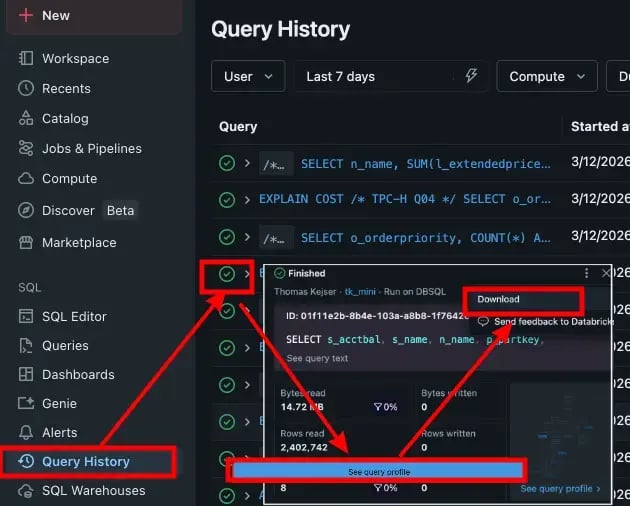
It can draw a pretty graph, and if I click that download button, I get a JSON file I can parse. Very nice. But where is the API I need to call to get that artefact?
Maybe the download button leads to a URL that I can cURL?
- Go Chrome Developer Tools (F12 for most of you)
- Network -> Start tracing
- Click the download button
- No network requests... None!
The download link does not issue an HTTP request? How does it get my browser to pop up the download dialogue?
Let's get our hands dirty (literally, because we are writing Javascript now).
First, we jump into the Console of our dev tools and trap the click event:
const oldClick = HTMLAnchorElement.prototype.click;
HTMLAnchorElement.prototype.click = function () {
  debugger;
  return oldClick.apply(this, arguments);
};
This will drop us into the JavaScript debugger when we click that download link.
The stack frame just before our trap is the one Databricks uses to handle the click event. We get:
return (r = function* (
  e,
  t,
  {
    fileExtension: r = "json",
    mimeType: a = "text/json",
    charset: i = "utf-8",
  } = {}
) {
  let n = e.replace(s, "_"),
    o = `data:${a};charset=${i},` + encodeURIComponent(t),
    l = document.createElement("a");
  return (l.href = o), (l.download = `${n}.${r}`);
  l.click(), 0;
});
Aha, so they (Databricks UX guys) are creating a fake <a> element and putting some o thing into it.
Inspecting o in the debugger we get:
"data:text/json;charset=utf-8, '<very long string of url-encoded JSON>'
You have got to be kidding me! The JSON document we are downloading is already on the page, in a JavaScript variable? But this little query is 286KB of JSON! How does this UX behave if the query is large? It isn't unusual to see megabytes of query plan data. Not my problem: That's for the poor Databricks engineers to worry about.
Did the UX download that JSON and put in on the page, just in case I decided to push the download button? And when I asked to download that JSON, it faked a <a href> to send my browser to a download dialogue?
It did exactly that!..
Oh no, coffee is running low again, this is going to be a long day.
How is that JSON for the Query Plan getting into the HTML?
If Databricks is using JavaScript like this, might their UX devs be fans of single page HTML with some React or other front end framework round-tripping and playing HTTP Ping-Pong?
I wonder if they preload that JSON during server rendering? Or maybe they grab it when I ask for the page via JavaScript?
Let's trace the request for the page that shows the query graph.
- Chrome Developer Tools
- Network -> Start tracing
- Go to the query graph page - reload the page
Here is the trace after reloading:
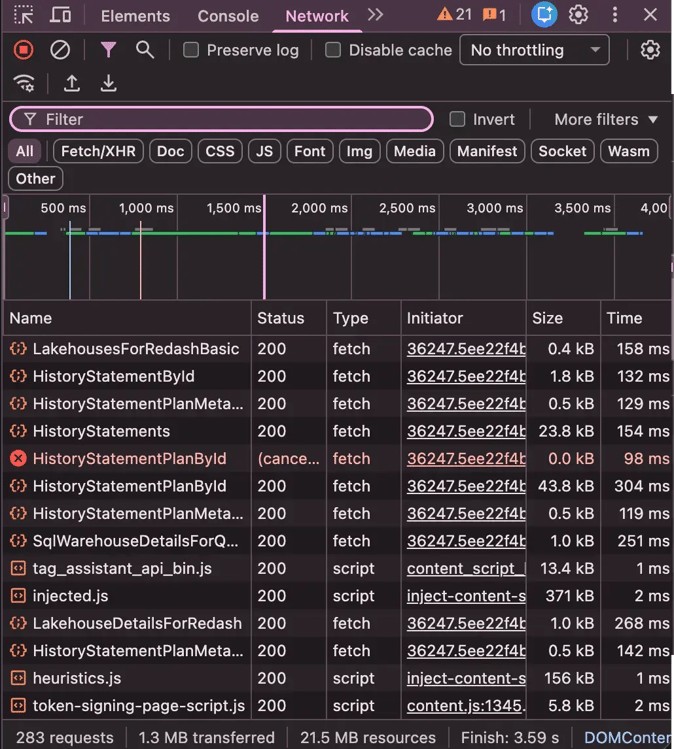
283 requests to the server to draw this page. No wonder this UX feels so laggy.
The UX requests plan JSON from the server while rendering, and we know that the payload is pretty big. If we filter the trace by large payloads and look for things with a response header of application/json, that should narrow it down.
Bingo!
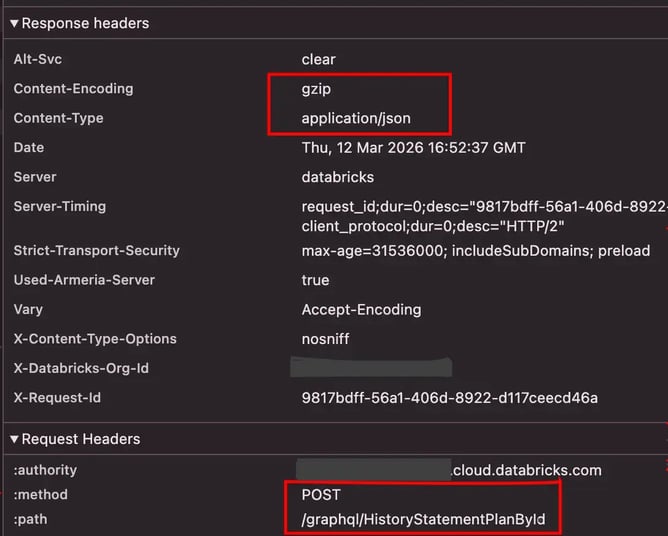
What do we know at this point:
- Databricks UX is using JavaScript to render the query graph
- The query graph is a JSON document
- That JSON document gets into the page via a GraphQL query
- We have the URL of the GraphQL endpoint that serves up Query Plans
Curling for the Query Plan
If we now copy that request as a cURL command, we should be able to just call the GraphQL endpoint directly.
No suck luck, if we try to repeat the request with cURL, we get:
{ "errors": [{ "message": "Graphql operation not authentic" }] }
Inspecting the, rather large, header payload, we see this:
-H 'x-csrf-token: <hex string>'
I am not a web developer, but I suspect what we are dealing with here is some mechanism that prevents URL requests from being replayed – even if the user is actually authenticated.
Where are we now:
- Databricks has removed the nice rest API Spark already has to get query plans
- They have then wrapped that API in a GraphQL API
- That you can't automate access to - even if you are authenticated!
It is beginning to feel like these guys are trying to hide something on purpose!
That coffee is getting cold, but I am not done here yet...
Can I use my PAT to access the GraphQL API or any API the UX uses?
Can we reach any of the GraphQL APIs using the PAT we used to run queries? If we take our PAT and put it in the auth header, does that allow us to talk to any of the endpoints the UX is consuming?
Sorry, no such luck, we get immediately rejected.
We have a PAT token that we can use to execute queries that could destroy the entire data lake. But that token cannot be used to ask about query plans. For that, you need OAuth in the interface and UX clicking.
Don't ask... just go with it...
Stealing the payload
We know that the UX can ask GraphQL for the JSON file we so desire. But we cannot replay or fake that request.
What if...
- We start a headless Chromium browser (i.e. a browser we can programmatically control)
- Open a real browser window and have the user OAuth into Databricks
- Save our newly authenticated access to Databricks (this authentication will last for a while)
- Automatically open the Chromium browser, navigate to that page with the Query Graph
- Before the page loads we create a small JavaScript hook into the
responseandrequestevent - Load the page
- When we see a response from GraphQL
- We use our hook to "steal" a copy of the payload
- Then forward the payload to the browser who will have no idea what we just did
That should work, but first, we have to figure out what URL to navigate to.
Looking at my TPC-H Q02 in the UX Query History – I see this:
https://$DATABRICKS_INSTANCE.cloud.databricks.com/sql/history
  ?queryId=01f11e2b-9c0a-10d3-a337-d98569f1d830
  &o=<org-id>
Seems easy enough: the queryId is the statement_id that was returned when we ran the query (consistency is overrated).
I already know the $DATABRICKS_INSTANCE: that it the URL I use to log into my Databricks. The <org-id> appears to be an integer value that Databricks uses internally. How do I get the <org-id> value programatically so I can automatically construct URLs like the above?
I wonder what happens if I just curl for the root of my $DATABRICKS_INSTANCE? Let's try:
curl -I "https://$DATABRICKS_INSTANCE.cloud.databricks.com"

HTTP/2 404
x-databricks-org-id: *********** <-- My <org-id> in cleartext!
strict-transport-security: max-age=31536000; includeSubDomains; preload
x-content-type-options: nosniff
x-request-id: 09d91cc2-c7f9-4eb7-ae3d-12929dee06c8
vary: Accept-Encoding
server: databricks
You have got to be kidding me! I can sniff this <org-id> without any authentication by just sending a request to the web server?
That's some funky 404 error code: "404: Almost not found, but here is some info you probably should not have"
But it works, and that was the missing piece.
I can now automatically:
- Locate the
<org-id>as long as I know the$DATABRICKS_INSTANCE(with a funky cURL request) - Generate the Query Profile UX URL for a query if I have the
statement_id - Inject JavaScript into a headless browser to steal the JSON payload
- Navigate to the page and grab the
EXPLAIN PLANI so desire
It's getting late here, I should probably grab a beer. The Balmer Peak is real.
When a statement_id does not work
I asked the friendly LLM to write me a script to steal query plans – nobody writes scripts manually these days. You can find it here: dbprove GitHub
Now, I can get expected row counts from EXPLAIN COST and I can then use the statement_id to get the query plan and the actual row counts.
But it stopped working when I ran the script twice! The JSON payload from GraphQL just disappeared! Manually navigating to the query profile page in the UX shows us why:
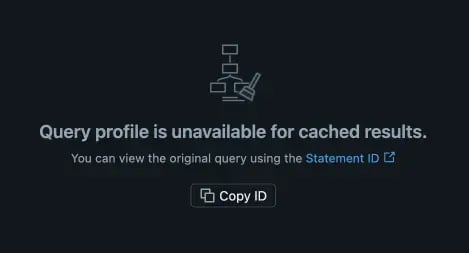
The statement_id is a unique identifier for a query.
But if the query is cached, its plan is stored as a different statement_id? And the UX designers thought it was a good idea to make me click again to find it instead of just showing me what I asked for?
I click the link, take a sip of my beer, and I see that the statement_id the link navigates to is different from the one I just ran. That new statement_id must be the statement that created the cache entry?
How do I get the relationship between the two statement_ids?
At this point I recalled a column called cache_origin_statement_id in the system.query.history view. Perhaps that column represents the relationship between the two statement_ids? But I also recalled that system.query.history is pointless, unless your time isn't valuable, and you can wait a long time between running the query and observing your results in the system view.
Interestingly, the UX is showing the queries I just ran almost immediately in the "Query History" tab. Does that mean the UX uses a different interface than system.query.history? It must do. Can that interface be queried programmatically?
Turns out there is another endpoint I can use that gets me the most recently run queries:
/api/2.0/sql/history/queries
And you can get the query you just ran with:
curl -s \
  -X POST "https://$DATABRICKS_INSTANCE.cloud.databricks.com/api/2.0/sql/history/queries" \
  -H "Authorization: Bearer $DATABRICKS_TOKEN" \
  -H "Content-Type: application/json" \
  -d '{
    "filter_by": {
      "statement_ids": [
        "<statement_id>"
      ]
    },
    "include_metrics": true
  }'
That API also returns something called cache_query_id - which is the statement_id of the query that created the cache entry. Yes, I know that naming makes no sense, but that is what the API is – cheers.
Why does this matter if the AI can just do it?
Couldn't the AI just navigate around the UX and grab query plans and analyse them? Likely, yes. Why do I then care about these automated interfaces? Why does good API design (and its total absense in Databricks) even matter?
If you have any experience with prompting LLMs, you will no doubt have noticed that they perform much better if they can check their own outputs and adjust them accordingly. The machines prefer consistency of interfaces, it makes them less likely to hallucinate.
Asking an LLM to tune a query is much more effective when you create a feedback loop where the LLM can quickly grab the query plan it just made and adjust course. Like humans, LLMs don't just nail a problem by thinking through it: they iterate and learn. And the faster they can iterate, the faster and cheaper they "think". Asking it to do that loop by navigating around a UX is setting fire to tokens and slowing down thinking speed.
Summary
We now have everything we need to construct a real EXPLAIN ANALYSE for Databricks. And we can do so programmatically.
The steps involved are:
- Use
EXPLAIN COSTto retrieve a barely parsable format of estimated row counts - Execute the query you care about with the REST API and retrieve the
statement_idfrom the response - Using this
statement_id, call into the query history REST API to get thecache_statement_id(if any) - Peek into the returned headers of an unauthenticated cURL request to your Databricks to get the
<org-id> - Construct a URL that will take you to the Query Profile page in the UX
- Inject some JavaScript into a headless browser to steal the JSON payload that contains the query plan when the GraphSQL query interface you can't programatically access directly returns it.
- Combine the JSON with the barely parseable
EXPLAIN COSTto reconstruct the query plan.
The dbprove repo I linked above has the basic script to help you do this. If you feel like digging deeper, I also has a little C++ API for running queries and explaining them in Databricks. I have code to parse the output of the JSON payload and turn it into a human-readable query plan format. But it isn't in a form I can share yet.
More about query plans soon, because I can only watch so much bad engineering before I need another drink.
Until next time...