
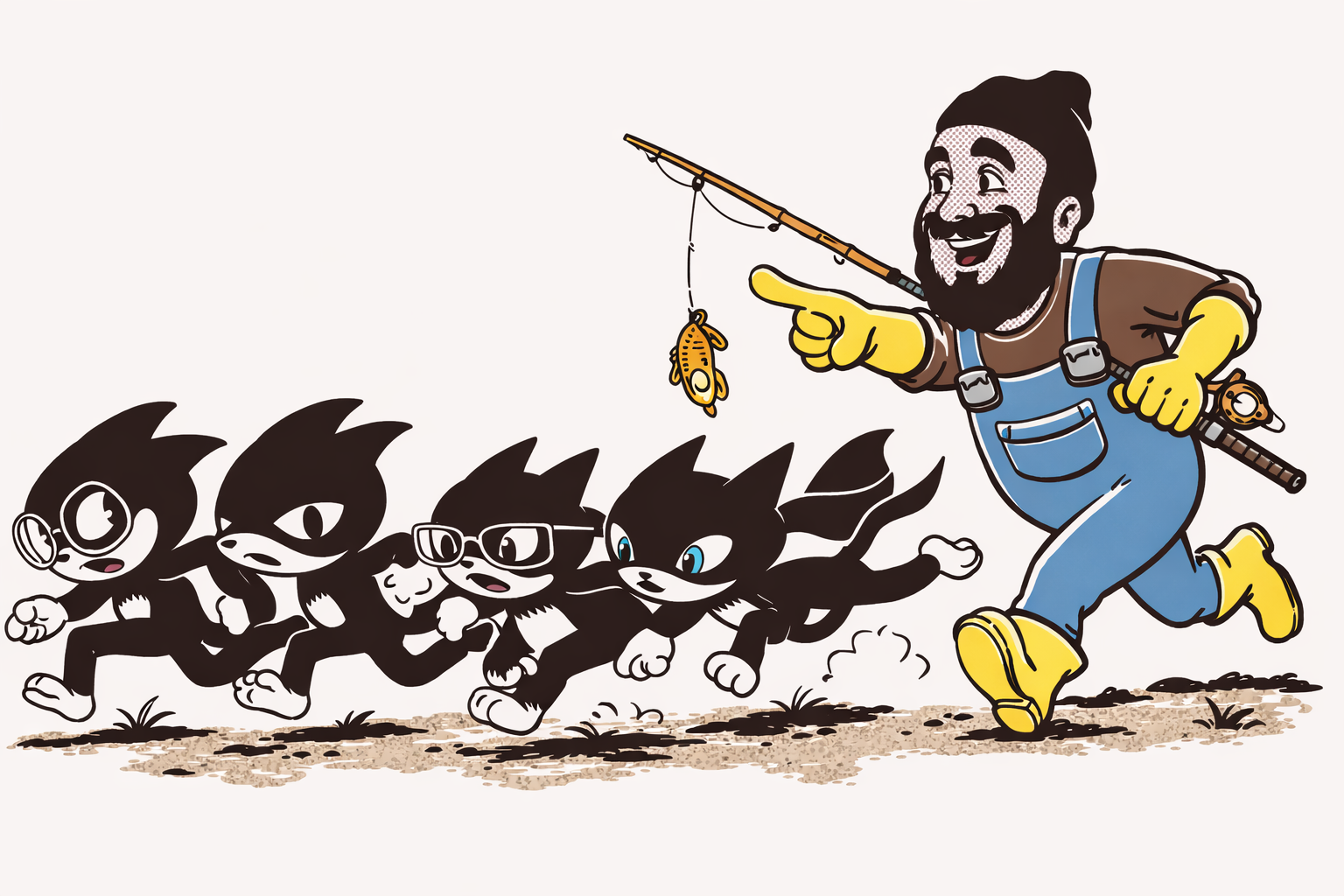
Have you ever struggled with enforcing governance and policies in your Kubernetes clusters? This is where Kyverno comes in. Today I will explain how Kyverno can help you.
When many engineers share the same cluster (DBAs, developers, DevOps, and security engineers), tracking all the changes becomes almost impossible.
Very soon, you end up with orphan resources and unanswered questions:
- Who created this deployment?
- Who owns this application?
- Why did someone forget to create a NetworkPolicy?
Kyverno helps bring order, consistency, and control to your Kubernetes environment.
What and Why Kyverno?
Almost everyone today uses infrastructure as code, but far fewer people use policy as code. The idea is simple: Instead of asking engineers to "please remember to label your resources" or "please don’t deploy insecure workloads", you write a policy that enforces these rules automatically. For example, if every resource needs a label, Kyverno can:
- Mutate the request and automatically add the creator based on who sent it.
- Validate the resource and deny it if the required labels or rules are missing.
Kyverno helps teams implement and enforce these policies consistently.
It's easy, it looks like this:
apiVersion: kyverno.io/v1
kind: ClusterPolicy
metadata:
  name: add-creator-label
  annotations:
    policies.kyverno.io/title: Add Creator Label
    policies.kyverno.io/category: Metadata
    policies.kyverno.io/description: >
      Automatically mutates incoming resource requests to add a
      'creator' label and annotation based on the identity of the
      requesting user. The label contains the sanitized username,
      the annotation stores the full ARN.
spec:
  background: false
  rules:
    - name: add-creator-label
      match:
        any:
          - resources:
              kinds:
                - "*"
              operations:
                - CREATE
      mutate:
        patchStrategicMerge:
          metadata:
            labels:
              +(creator): ""
            annotations:
              +(creator-arn): ""
Kyverno Architecture
As with every cloud-native solution, Kyverno is composed of different components. Each component has its own job. Understanding what they do helps you see how Kyverno applies policies in a reliable and scalable way.
Here is what a typical Kyvermo setup looks like:
kubectl get deploy -n kyverno
NAME                            READY   UP-TO-DATE   AVAILABLE   AGE
kyverno-admission-controller    1/1     1            1           6d
kyverno-background-controller   1/1     1            1           6d
kyverno-cleanup-controller      1/1     1            1           6d
kyverno-reports-controller      1/1     1            1           6d
In this section, we will look at each of these components, what it does, and why it is important.
kyverno-admission-controller
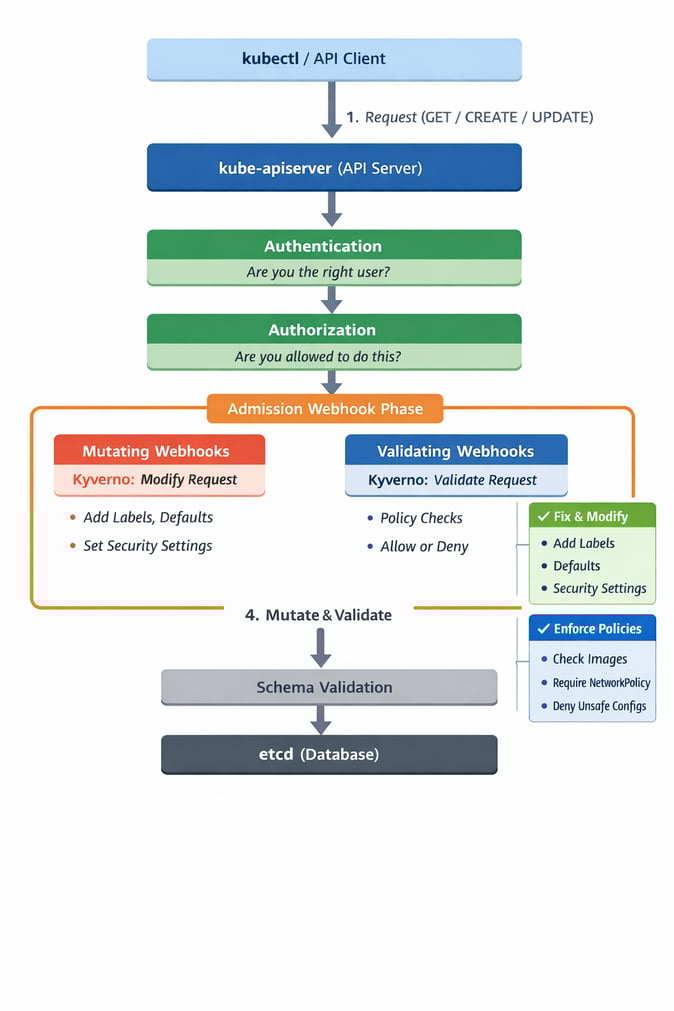
Before explaining Kyverno admission controller, it helps to understand how the Kubernetes API handles a request. When someone runs a command like kubectl get pods, the CLI sends a request to the kube-apiserver, which is the main part of Kubernetes. The request goes through a few steps.
- Kubernetes checks who you are (authentication).
- It checks what you are allowed to do (authorization).
- It enters the admission phase.
During admission, Kubernetes runs mutating webhooks first and then validating webhooks. These webhooks can change the request or decide if the request should be accepted or rejected.
This is exactly where the Kyverno admission controller works. The kyverno-admission-controller acts as both a mutating and a validating webhook. It intercepts API requests and applies your Kyverno policies, making sure all new or updated resources follow your rules before Kubernetes saves them.
Wait a minute, what about all the resources that already existed before you installed Kyverno or applied your policies? Do you need to recreate everything? Of course not. This is exactly why the kyverno-background-controller exists.
kyverno-background-controller
The background controller reviews all existing resources in the cluster and checks them against your policies. If something is missing labels, security settings, defaults, annotations, etc. The controller will apply the necessary changes (depending on the policy type).
This also helps when manual changes cause a resource to drift and become non-compliant.
If you don’t want to wait for the next background scan, you can force Kyverno to reconcile immediately by adding this annotation:
kyverno.io/reconcile="$(date +%s)" --overwrite
This forces Kyverno to reconcile the resource immediately.
kyverno-cleanup-controller
Many teams end up paying for orphan EBS volumes created by PVCs that were released but never removed. These leftover resources stay forever and increase cost without anyone noticing.
The kyverno-cleanup-controller helps solve this problem by automatically cleaning resources you no longer need. This keeps your Kubernetes cluster healthy, organized, and more cost-efficient.
As the name describes, this controller handles resource clean-up defined in:
cleanuppolicies.kyverno.io
Be careful when using cleanuppolicies.kyverno.io, or you might end accidentally deleting resources. That could hurt a lot of people.
kyverno-reports-controller
How do we track all the work done by the other components?
The kyverno-reports-controller is responsible for automatically creating reports about the policies that were applied. It creates PolicyReport (scoped to a namespace) and ClusterPolicyReport (scoped to cluster-wide resources).
These reports show the status of each policy, including whether it passed, failed, or produced warnings.
Below is an example of a ClusterPolicyReport created by Kyverno:
kubectl describe clusterpolicyreport 934a0f68-7476-46ab-bb7d-8ea9c3e6d3ea
Name: 934a0f68-7476-46ab-bb7d-8ea9c3e6d3ea
Namespace:
Labels: app.kubernetes.io/managed-by=kyverno
Annotations: <none>
API Version: wgpolicyk8s.io/v1alpha2
Kind: ClusterPolicyReport
Metadata:
  Creation Timestamp: 2025-12-17T05:23:14Z
  Generation: 66
  Owner References:
    API Version: v1
    Kind: Namespace
    Name: cloudflare
    UID: 934a0f68-7476-46ab-bb7d-8ea9c3e6d3ea
  Resource Version: 3616047
  UID: 5d7edd93-5904-4e59-94b0-86b78d58958c
Results:
  Policy: require-resourcequota-per-namespace
  Result: pass
  Rule: generate-default-resourcequota
  Scored: true
  Source: kyverno
  Timestamp:
    Nanos: 0
    Seconds: 1765950936
Scope:
  API Version: v1
  Kind: Namespace
  Name: cloudflare
  UID: 9XXX0XXX-7XXX-4XXX-bXXX-8ea9XXXXXXXXX
Summary:
  Error: 0
  Fail: 0
  Pass: 1
  Skip: 0
  Warn: 0
Example Use Case
One of the common scenarios in Kubernetes is using a Horizontal Pod Autoscaler to scale your pods based on the workload. At the same time you use a Cluster Autoscaler to scale nodes based on the demand.
A company I worked at before had the above configuration and they had a misconfigured HPA, which started to scale pods, and the Cluster Autoscaler scaling nodes on AWS. They ended up having 30 i4i.32xlarge instances over the weekend and having to pay a lot of money — 30 instances × $10.9824/hr × 48 hours ≈ $15,814.66. All of this could have been avoided by placing a ClusterPolicy to set up a ResourceQuota for every newly created namespace, as seen in the example below.
How to prevent this?
Kyverno can help you prevent this kind of accident and reduce cloud costs. By applying a ClusterPolicy to enforce a ResourceQuota in each namespace, your pods will not scale above what you expect.
apiVersion: kyverno.io/v1
kind: ClusterPolicy
metadata:
  name: require-resourcequota-per-namespace
spec:
  validationFailureAction: Enforce
  background: true
  rules:
    - name: generate-default-resourcequota
      match:
        resources:
          kinds:
            - Namespace
      exclude:
        resources:
          namespaces:
            - kube-system
            - kube-public
            - kube-node-lease
            - kyverno
            - argocd
      generate:
        kind: ResourceQuota
        apiVersion: v1
        name: default-resourcequota
        namespace: ""
        synchronize: true
        data:
          spec:
            hard:
              requests.cpu: "2"
              requests.memory: 4Gi
              limits.cpu: "4"
              limits.memory: 8Gi
              pods: "20"

By creating this policy, it will ensure that all targeted namespaces have a ResourceQuota automatically applied. This prevents us from exceeding the planned resources if something goes wrong.
This is a simple example of how Kyverno makes validation and mutation easy in your Kubernetes cluster.
Kubernetes has RBAC, why do I need Kyverno?
Kubernetes already has RBAC, and RBAC is good at deciding who can do what. But that's the RBAC limit. If an engineer is allowed to deploy, RBAC will not stop them from deploying something unsafe, non-compliant, or costly.
Kyverno is not about access control. It is about governance and compliance. It defines what is acceptable in your cluster, even for users who already have permission to deploy.
Summary
Kyverno is also easy to work with and helps your manage your Kubernetes cluster.
- Policies are simple YAML, no need to learn Rego or any new language.
- Many predefined policies are already available and ready to apply.
You don’t have to write every policy from scratch. Many predefined policies already exist in the official Kyverno repository: https://github.com/kyverno/policies